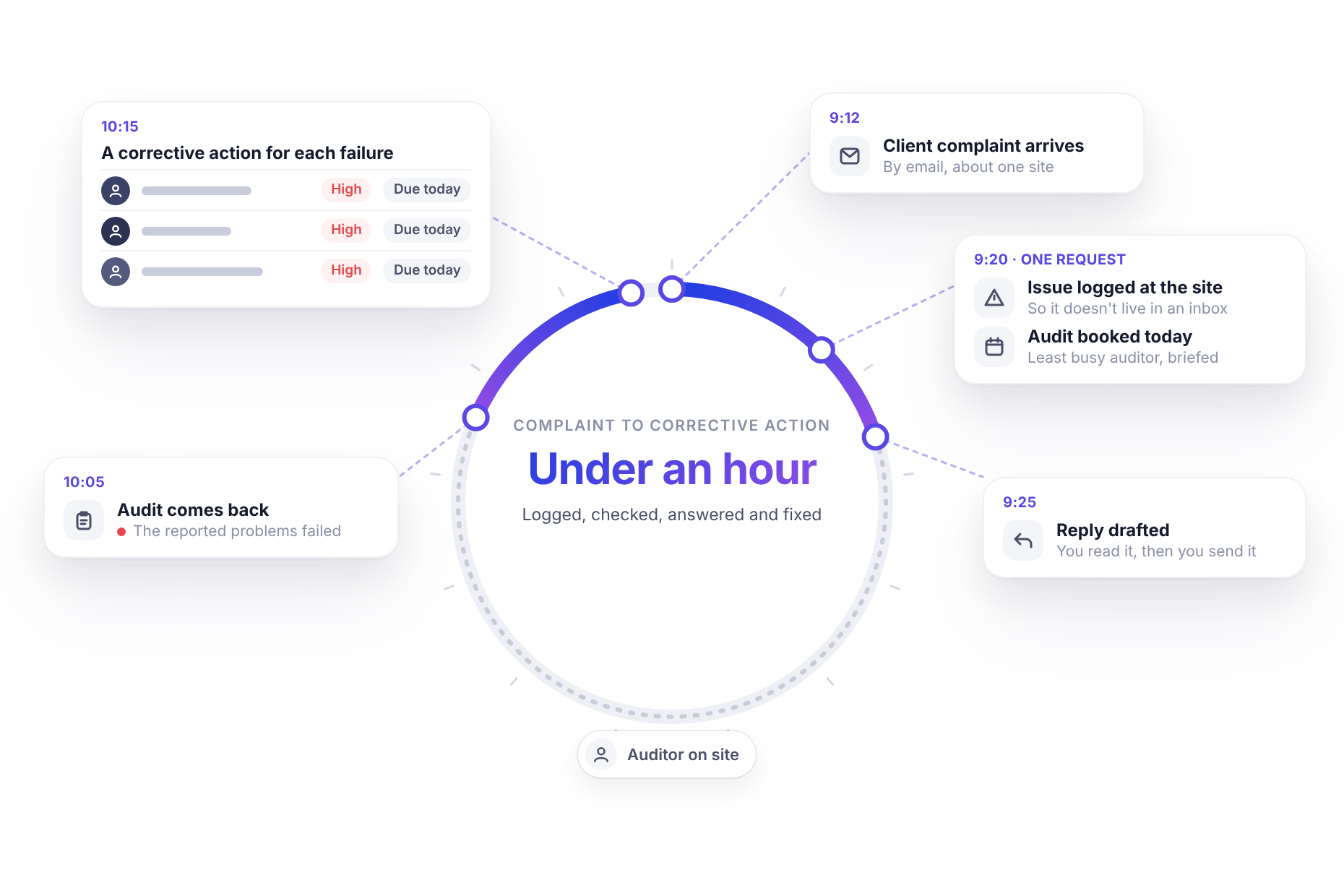
9:12 on a Thursday. An email lands from the airport’s commercial manager. Three online reviews this week say the Terminal 2 bar isn’t being kept clean: sticky tables, overflowing bins, a restroom nobody seems to check. She’d like to know what you’re doing about it.
You run eight bars and cafés across the airport under contract. This is the client who renews that contract next spring.
The usual path is familiar. Forward the email to the bar manager. Ask someone to pop in when they can. Reply with “thanks, we’re looking into it.” The complaint lives in your inbox, the check happens tomorrow or the day after and if anyone asks in three months what was done about it, the answer is somewhere in an email thread.
Here’s what the same morning can look like with an AI assistant connected to monitorQA and your email.
What a complaint actually deserves
A client complaint needs more than a reply. To handle it properly, you need:
- a record, so the complaint is tracked against the site and doesn’t depend on someone’s inbox
- a check, by someone who knows exactly what was reported
- a response to the client that says what’s happening, when and who’s doing it
- a fix for whatever the check finds, with an owner and a deadline
- proof that all of the above happened, for the next time someone asks
None of these steps is hard. They just live in different places, which is why the first one usually gets skipped and the last one rarely exists.
9:20: one request
With monitorQA and Gmail both connected to an assistant like Claude (the setup guide covers both), the first response is one request:
“Log the airport’s email about the Terminal 2 bar as an issue, book a hygiene audit there today with the least busy auditor, brief them on the complaint and link it to the issue. Show me a short plan first.”
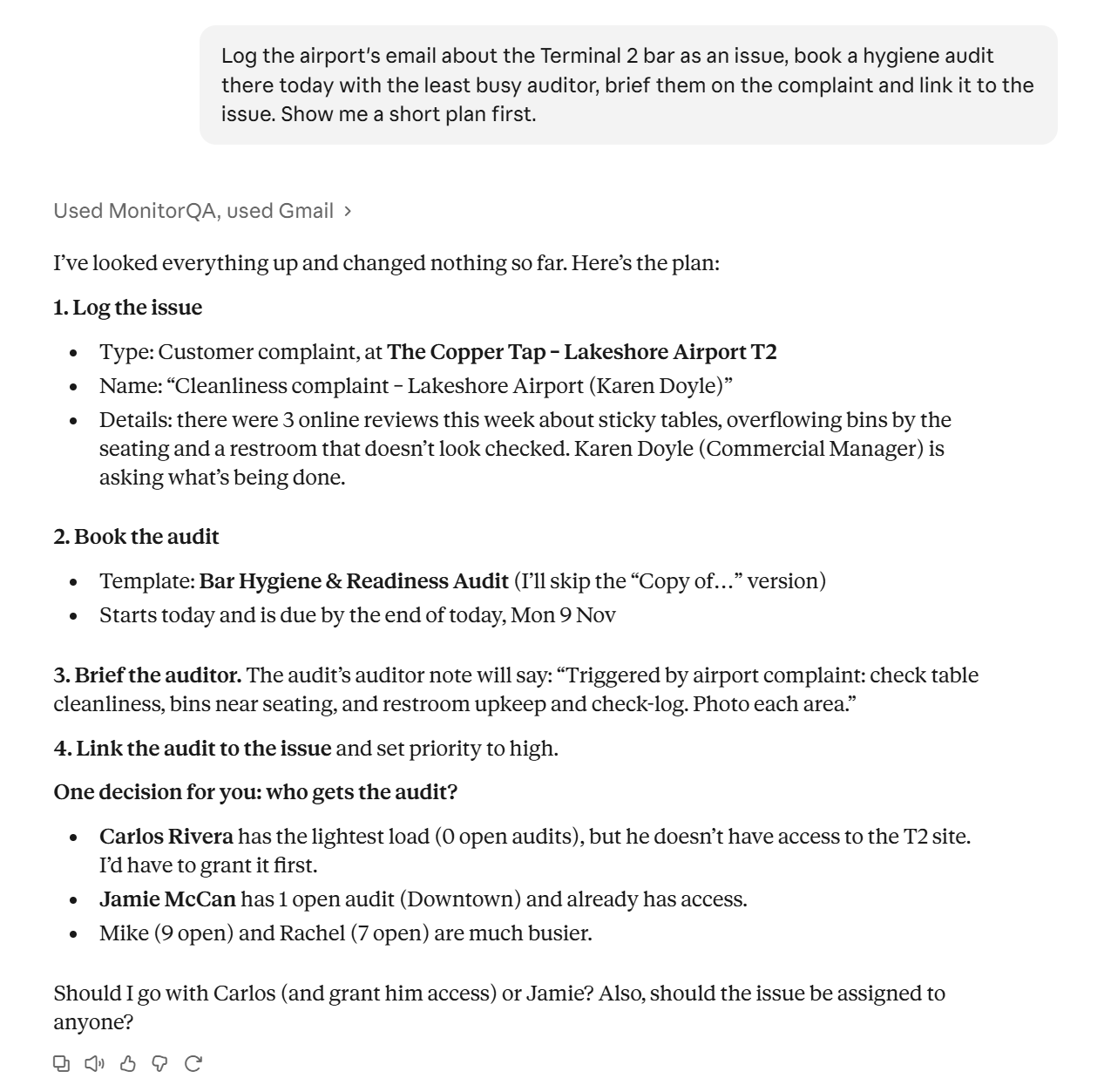
The assistant finds the email, matches “Terminal 2 bar” to the right site in monitorQA and checks who’s available. Then it lays out the plan:
A few details make the difference here:
- The site match is shown, not assumed. If the email had said “the bar near gate 14” and two sites could fit, the assistant would ask rather than guess.
- The auditor is chosen by load. The assistant counts what each auditor already has open and suggests the one with room so the urgent check doesn’t push someone else’s work into overdue. If the least busy auditor can’t see the site yet, it says so and offers the next best option.
- The briefing is specific. “Client complaint: sticky tables, overflowing bins, restroom not checked. Check these first and photograph what you find.” The auditor knows why they’re there before they walk in.
The record and the audit, linked
Approve the plan and the complaint becomes an issue in monitorQA, attached to the Terminal 2 bar. The hygiene audit is linked to it so anyone looking at the issue later can see exactly what was done in response.
This is the step that usually gets skipped and the one that matters most later. A complaint that’s logged against a site becomes part of that site’s history. It shows up in briefings for future audits, in weekly reviews and in any report on how complaints were handled.
A reply that says something
Next, the reply. Same conversation, one more line:
“Now draft a reply to the client saying what we’re doing. Don’t send it.”
The assistant saves a draft in the client’s email thread. It’s short and specific and it doesn’t promise results it can’t know yet. It says what’s happening:
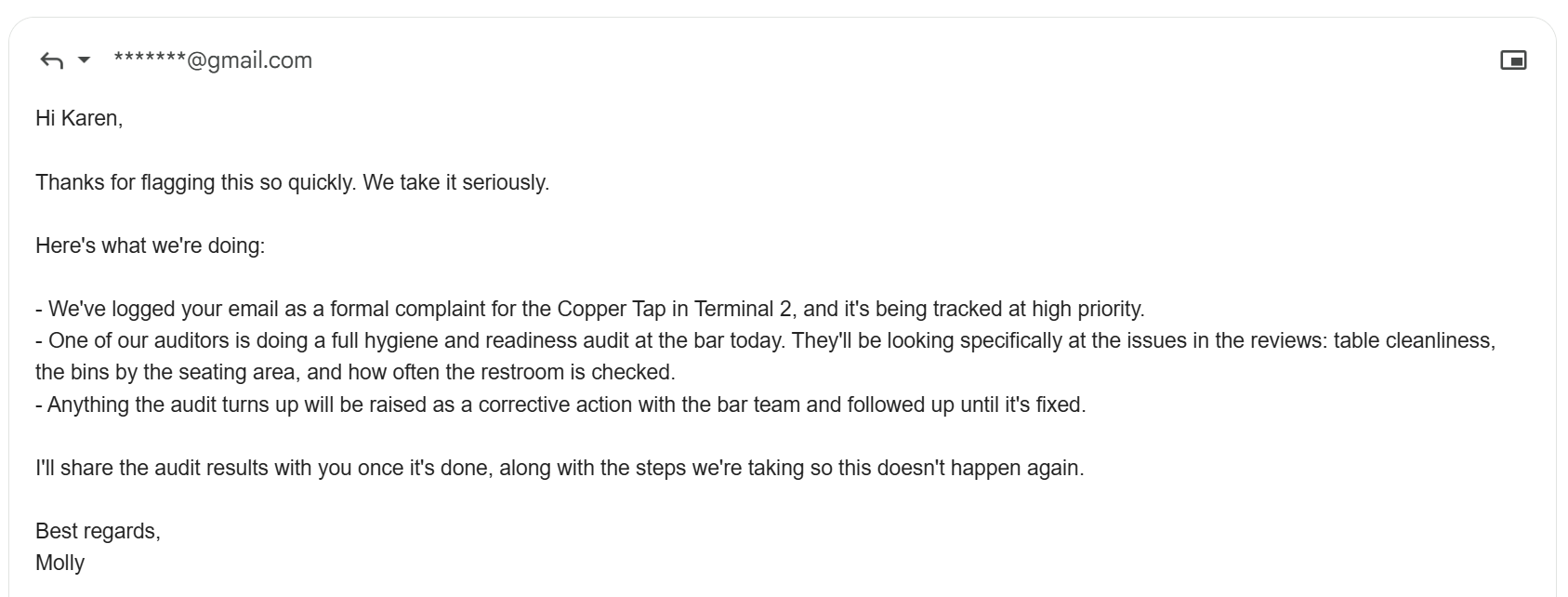
You read it, change a word if you like and send it. At 9:25, the client has a reply that says what’s happening and when she’ll hear more. That’s a very different message from “we’re looking into it.”
10:05: the audit comes back
The auditor completes the audit at 10:05. It scores 74%. Tables and bins failed and the restroom check log hadn’t been signed since 6 a.m.
Now the findings need owners:
“The Terminal 2 hygiene audit just came in. Create a corrective action for each failed item, assigned to the bar manager, high priority, due by the end of today. Mention the client complaint and the audit in each description.”
Three corrective actions appear on the Terminal 2 bar, one each for tables, bins and restroom checks, each with an owner, high priority, today’s date and a description that names the complaint and the audit.
At 10:15, an hour after the email arrived, the complaint is logged, checked, answered and turned into specific fixes due today. A short update to the client follows the same way: what the audit found, what’s being fixed and when it will be re-checked.
Following those actions through to completion and confirming the fix with a re-check, is the subject of Every failure gets an owner.
Making it automatic
In this story, the manager started things by asking. You can also put it on a schedule. An hourly sweep of your inbox can find new complaints, log them, book the audits and draft the replies for you to approve.
Two things to know about that. The assistant checks on the schedule you set so a complaint is picked up within the hour, not the moment it arrives. And it should flag anything unclear rather than act on it: an email that doesn’t name a site or one that could be a complaint or just a question, goes to you first.
Keep a person on the send button
Logging an issue or booking an audit is easy to correct if something’s off. An email to a client isn’t. For anything going outside your organization, keep the step where you read the reply before it’s sent. It takes thirty seconds and it’s the difference between a fast response and a fast mistake.
Replay your last complaint
Find the last complaint a client or customer sent you. Look at how long it took to log it, check it, reply and fix it and whether you could show someone today exactly what was done.
Then run it through the assistant as if it had arrived this morning. Comparing the two will tell you quickly whether it’s worth making this how complaints are handled.