Monday, 9:10. A grocery store reports rodent droppings in its back stockroom. The pest contractor is booked, the area is cleared and the immediate problem is handled.
Then comes the question that actually keeps the operations director up at night: is it just this store?
The usual answer is an email to every store manager in the region asking them to check and reply. By Wednesday, half have replied “all fine.” Nobody’s sure how carefully they looked. A few haven’t replied at all. On Friday, someone builds a spreadsheet from the replies and it still doesn’t really answer the question.
There’s a better way to run a check like this, and it starts with a single instruction.
Why one-off checks are hard to run well
A regular audit program runs on rhythm. A one-off check across many sites, call it a campaign, has to be set up from nothing, usually in a hurry. To be worth anything, it needs:
- the same checklist at every site so results can be compared
- every site in scope covered, with nobody missed
- a named person and a deadline for each one
- a way to see progress without chasing everyone
- a clear summary at the end that answers the original question
An email chain manages almost none of that. Setting it up properly in an audit system manages all of it but takes a morning of creating audits one by one. So most organizations end up with the email.
<<cta>>
The whole campaign in one instruction
With monitorQA connected to an assistant like Claude (the setup guide covers how), the morning shrinks to a sentence:
“Run a pest control check at every store in the North region this week, due Friday, assigned to each store’s usual auditor. Brief each auditor on any pest-related failures from that store’s last two audits. Show me the plan first.”
The assistant finds every store in the North region, picks the Pest Control checklist (or tells you if there isn’t one), works out who usually audits each store, and reads each store’s recent results for anything relevant to the briefing. Then it lays out the plan:
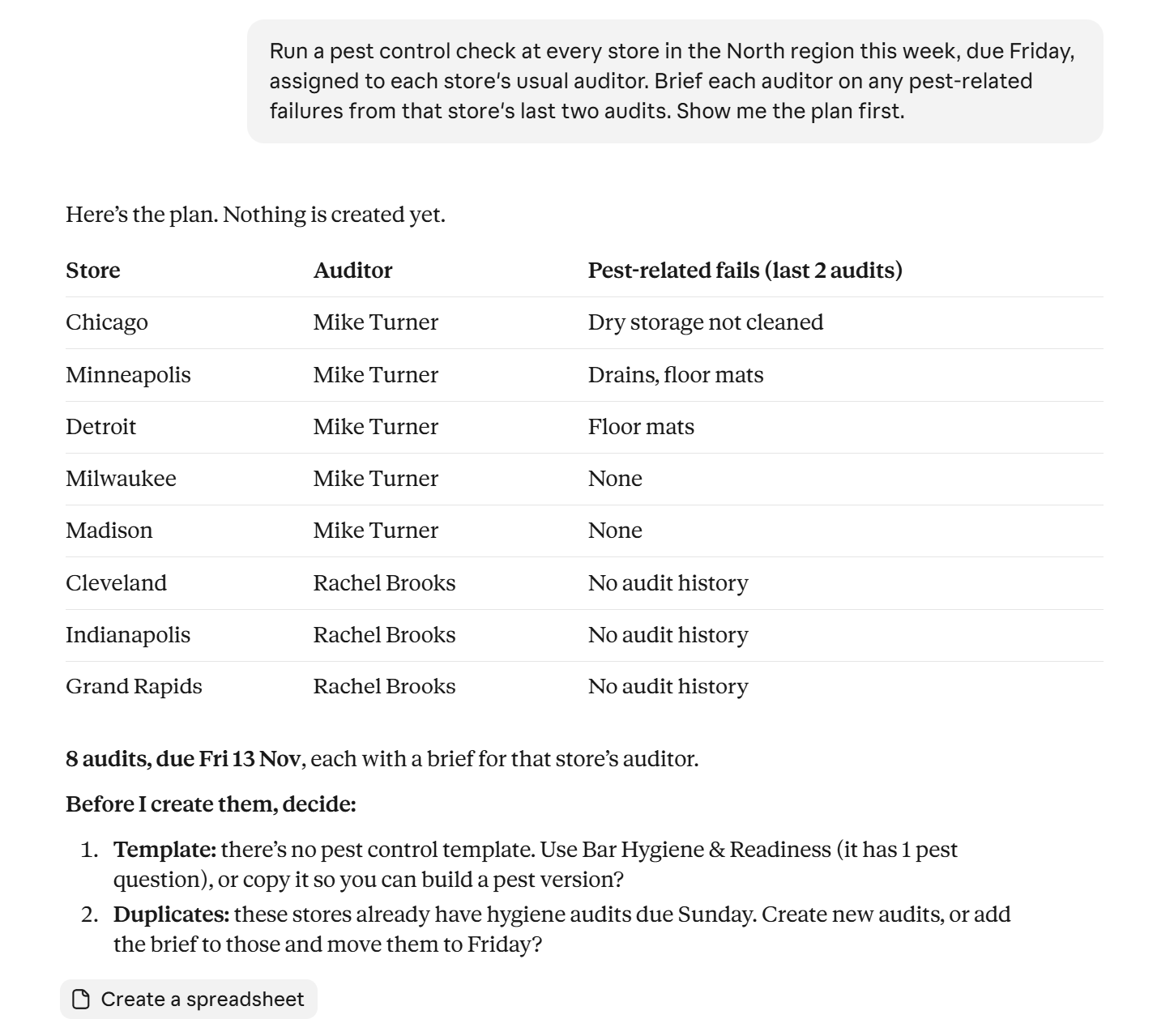
The flags are the useful part of the preview. A checklist that doesn’t quite fit or stores that already have an audit due the same week, would have quietly slipped through in an email chain.
Here, they’re caught before anything is created. Answer the questions, confirm the plan and the audits are on the calendar.
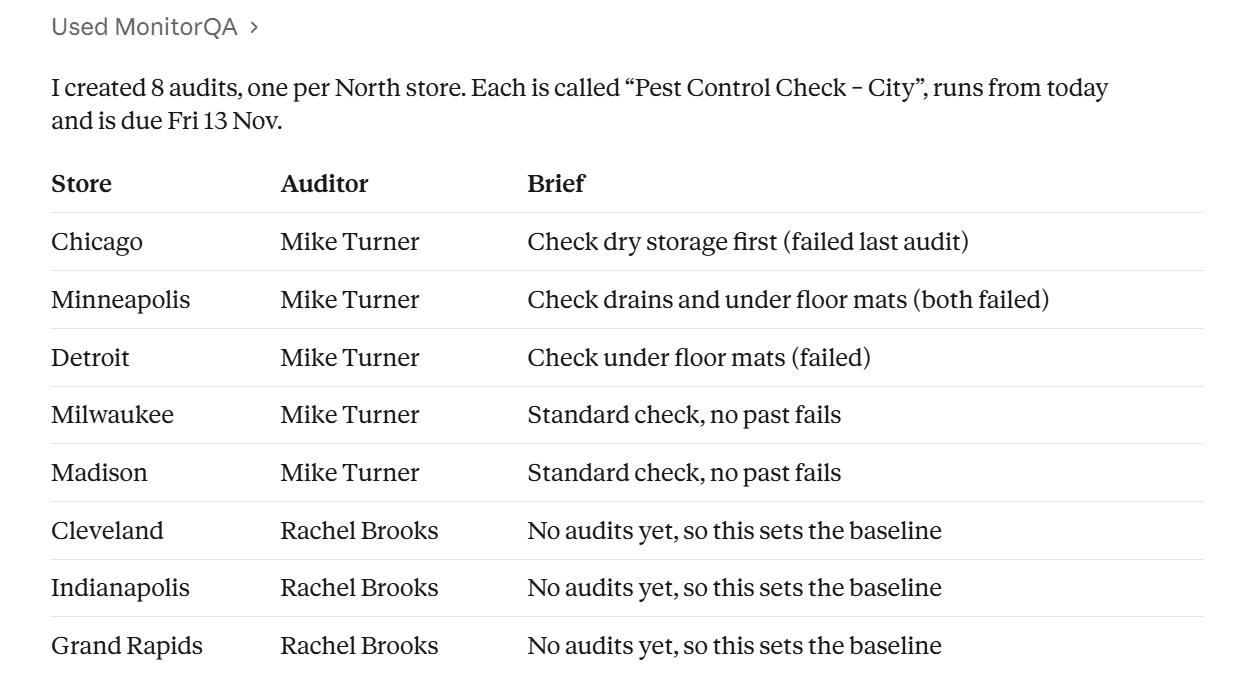
Each store gets its own note, not a copy-paste. A store with a history of gaps under the loading dock door gets told to look there first. A store with a clean record gets a short, routine note. (Brief every auditor before they arrive covers what makes a good briefing.)
Midweek: how is it going?
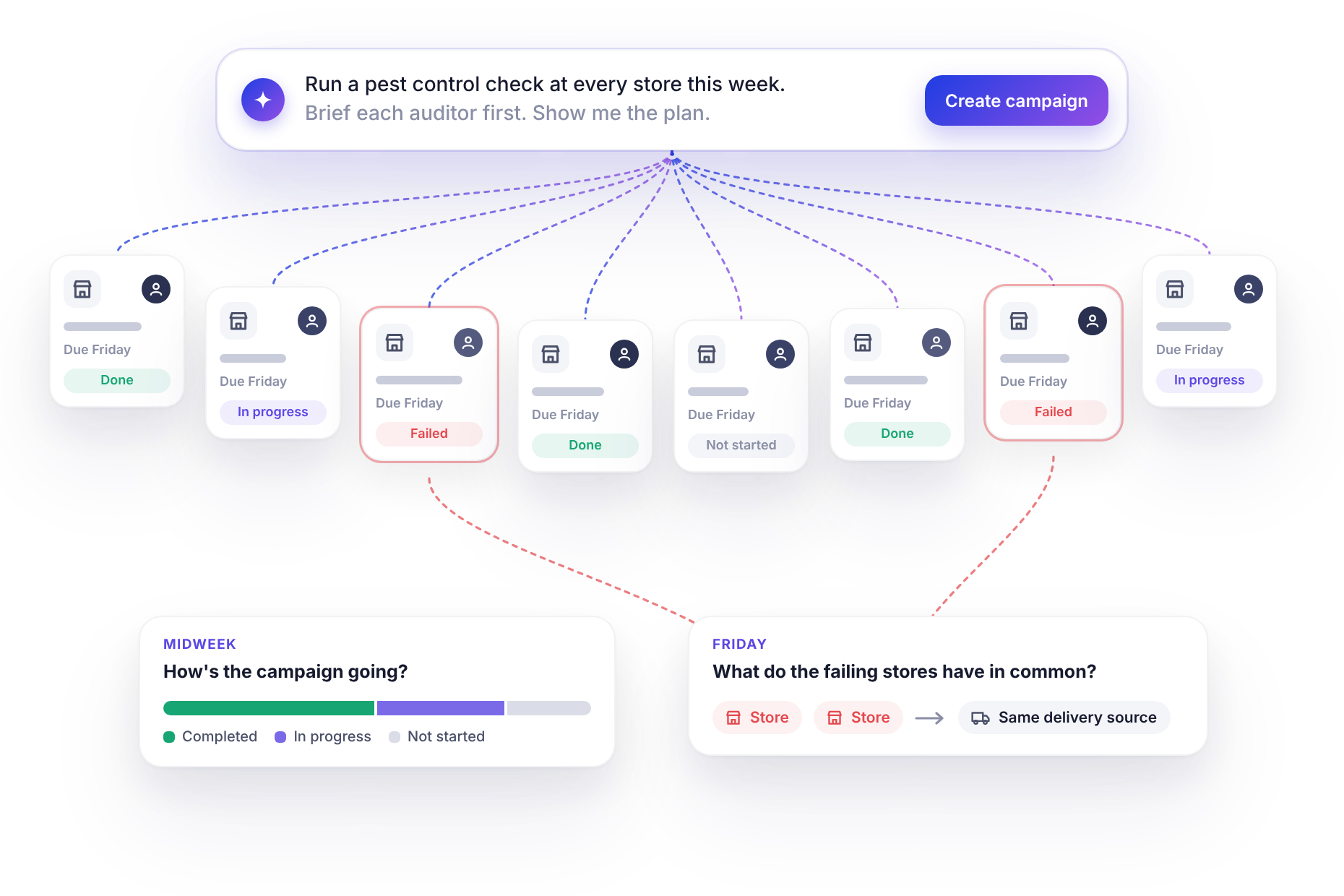
Because the campaign lives in monitorQA as real audits, progress is something you can ask about rather than chase:
“How’s the pest control campaign going? Who hasn’t started and has anything failed so far?”
The answer lists how many campaign audits are completed, in progress and not started, with names against the ones that haven’t started and any failed checks so far.
The not-started list is the one to act on. If an auditor has five campaign audits and two regular ones due the same week, the problem is capacity, not effort, and the audit can be moved to someone with room (Nothing overdue, nobody overloaded covers how).
Results come in as auditors complete their audits, and the assistant reads them when you ask. If you’d rather not ask, a daily summary can be scheduled for the length of the campaign.
<<cta>>
Friday: the answer to the original question
Once the deadline passes, ask for the summary:
“Summarize the pest control campaign. Which stores showed signs of activity, what exactly failed and do the failing stores have anything in common?”
Say 22 stores were checked and three showed signs of pest activity. Two of them failed the same question about sealing gaps at loading doors, and the store notes in monitorQA show all three take deliveries from the same distribution center. That’s the kind of pattern the summary is for.
This is the moment the campaign pays for itself. Three stores out of 22 isn’t a regional crisis but the pattern points somewhere useful: the problem may be arriving with the deliveries rather than starting in the stores. That’s not something an inbox full of “all fine” replies would ever have shown.
From here, the next steps are the usual ones: a corrective action at each affected store with an owner and due date (Every failure gets an owner covers this), and perhaps a visit to the distribution center.
Campaigns worth keeping in your back pocket
Pest control is one example. The same one-sentence pattern fits any “check everywhere, now” situation:
- An incident at one site. A slip in one store’s cold room, a fire door found chained at another. Check whether the same conditions exist elsewhere.
- A recall or supplier issue. Confirm a product has been pulled from every shelf, with an auditor’s sign-off rather than a reply-all.
- Seasonal risk. Heatwave checks on refrigeration, winter readiness for parking lots and entrances.
- A new policy. A month after rolling out a new procedure, check that every site is actually following it.
- Before a peak. A pre-holiday readiness check across every store, two weeks out.
A few things to sort out first
Campaigns move fast, so it helps to have the basics ready before you need them:
- The checklist must already exist. The assistant can find and use a checklist or copy one for you to adjust but it can’t create a new one. A short library of campaign checklists in monitorQA (pest control, cold chain, fire safety) means you’re never stuck.
- Your regions need to match how you think. “Every store in the South region” only works if the stores are grouped that way in monitorQA. 50 sites live in an afternoon covers setting up units.
- Calling it off. If a campaign turns out to be unnecessary, ask the assistant to expire the remaining audits rather than delete them. You keep a record of what was started, and deletions can’t be undone.
<<cta>>
Write your next campaign down today
Think of the incident you’d least like to discover had spread across your sites. Check that you have a checklist for it in monitorQA, and that your sites are grouped the way you’d want to scope it.
Then, when it happens, the response is one sentence and by Friday you’ll have an answer you can trust instead of a pile of replies.